| Google's Open Source Video Player |
| Written by Mike James | |||
| Saturday, 07 January 2012 | |||
|
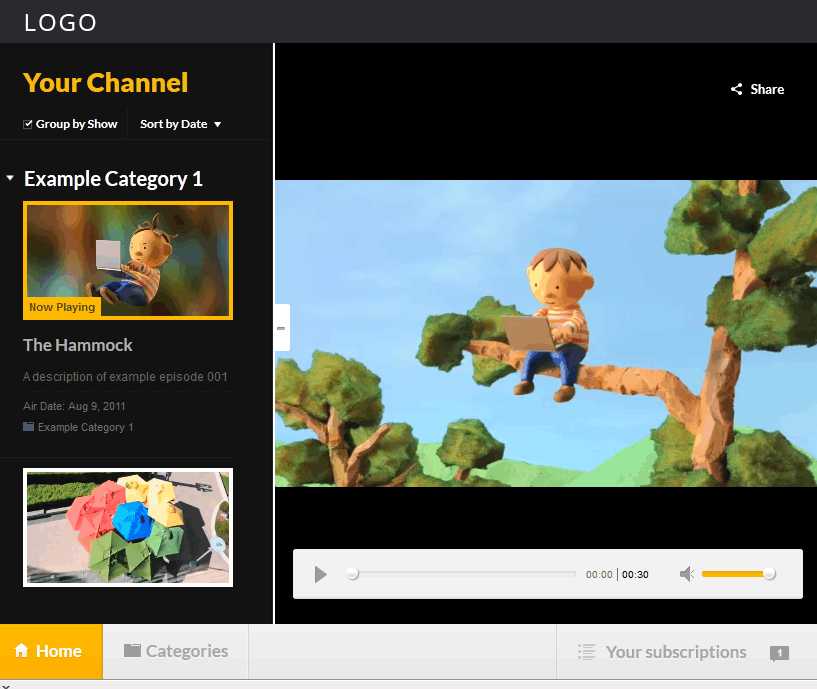
Perhaps Google isn't all bad these days! A new open source HTML5 video player is yours for the download. As well as being a good showcase app it is also practically useful.
Perhaps Google isn't all bad these days! A new open source HTML5 video player is yours for the download. As well as being a good showcase app it is also practically useful. It is the architectural core of the new 60 Minutes and RedBull.tv apps available in the Chrome Web Store. As well as being a basic video player, the app allows the user to add their own content, be it a single episode or a playlist. A Category page also allows the user to build up a catalog of things they would like to watch. The user interface is fairly polished and you can try it out at The Video Player Sample.
You can modify the configuration via the config.json which as you might guess is a JSON format file. Using this you can customise the component without having to dig inside. However, if you hope to use the viewer in your own project the code can be downloaded from Google Code. The project follows a MVC style architecture and uses the Closure JavaScript library.The final app is compiled using the Closure compiler - I wish Google would invent some more names for things. The Closure compiler is simply an optimizing JavaScript to JavaScript compiler and so the end result is still an HTML5 compatible app. Another pleasant surprise is that the documentation is quite good for an open source project. You should be able to figure out how it all works without having to dig too deep into the code. The key features of the app are (according to the Google Code Blog):
Notice the third point - it will play the standard formats but what it will play depends on the browser, hence we still need the Flash fallback. It works well with Chrome and also "modern" browsers. We tested it with Firefox and IE9 and it works perfectly. It can also be downloaded and installed into Chrome from the Chrome Web Store, which also brings with it the ability to subscribe to shows.
More InformationGoogle Open Source blog: Introducing Video Player Sample Google Code - source code and documentation
Comments
or email your comment to: comments@i-programmer.info
To be informed about new articles on I Programmer, subscribe to the RSS feed, follow us on Google+, Twitter, Linkedin or Facebook or sign up for our weekly newsletter. 
|
|||
| Last Updated ( Saturday, 07 January 2012 ) |