| GitHub Desktop Released |
| Written by Kay Ewbank | |||
| Wednesday, 20 September 2017 | |||
|
GitHub has redesigned GitHub Desktop with Electron to provide a way for developers to extend their GitHub workflow beyond their browsers.
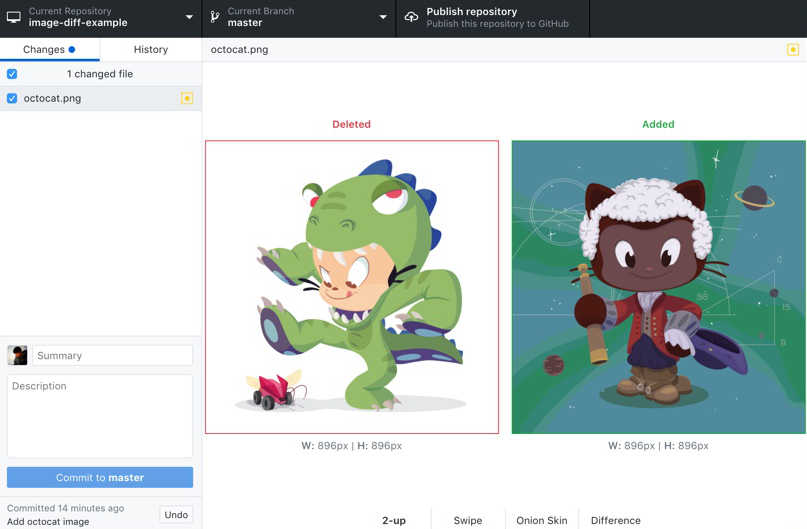
The developers say the open source GitHub client offers a unified cross-platform experience. The same codebase now covers MacOS and Windows, whereas the previous versions had separate codebases, and were worked on by two separate teams of developrs. The GitHub Desktop client lets you create branches, collaborate with other developers, and commit changes without needing to use the command line. The new version was recoded from the ground up in Electron to create a simplified user experience. Electron was developed by GitHub as an open source library that can be used to build cross-platform desktop applications using a mixture of HTML, CSS, and JavaScript. The developers of the desktop client looked at how programmers ue GitHub, and came up with a design that lets experienced GitHub users work across multiple projects without problems, while those new to Git and GitHub can get comfortable without the command line. Only a small percentage of GitHub users have in the past used the Desktop client, most sticking with the command line. However, the developers believe some operations such as text-heavy editing of documentation are better handled on the desktop. One example given is that of working with groups of files and specific lines in partial commits. The improvements from the beta to the 1.0 release include simpler comparison of images; faster cloning of repositories; access to the editor from both the app and the GitHub Desktop; and compatibility between GitHub Desktop and GitHub Enterprise. The ability to compare images means you can look individually at the before and after versions, or just at the changed elements. You can also swipe or fade to move between the before and after images.
Repository management means you can see all your repositories and clone them with the click of a button. If the files are stored in Git Large File Storage (LFS), they are downloaded in parallel for even faster cloning. The access to the editor from both the app and the desktop means you can open whichever editor or shell you prefer from the app, or jump back to GitHub Desktop from your shell. GitHub Desktop also works with GitHub Enterprise, so you can log in to your GitHub Enterprise server and work from within the Desktop.
More InformationRelated ArticlesGitHub Extends Developer Program GitHub Platform and Community Improvements Github Victim Of Its Own Success GitHub Introduces New Pricing For Private Projects GitHub Octoverse Reveals The State Of Open Source Atom 1.18 Ships With Rich Git Integration
To be informed about new articles on I Programmer, sign up for our weekly newsletter, subscribe to the RSS feed and follow us on Facebook or Linkedin.

Comments
or email your comment to: comments@i-programmer.info |