| Mastering VB Controls |
| Written by Mike James | |||||
Page 4 of 4
Processing the dataTo process the data first we need to set up some variables to hold the values and to convert them into suitable types. The main new instruction is the use of Single which is short for single precision numbers - as you can probably guess as there is a Single there is also a Double. In this case a single precision calculation is sufficiently accurate: Dim amt As Single=ComboBox1.SelectedItem The number of years is converted nto months and the interest rate is converted from a percentage to a decimal fraction e.g. 8% is 0.08 and then divided by 12 to give a monthly interest rate. The variables mpay and tpay will be used to store the monthly and total payments respectively. Next we have to compute the interest payments either using a repayment mortgage or interest only. All we have to do is use an If statement to test if the appropriate RadioButton is pressed: If RadioButton1.Checked Then If RadioButton2.Checked Then
Label5.Text = Format(mpay, "Currency") The only new feature here is the use of Format to create a correctly formatted currency display. Now we have the calculation routine - but when should it be use or called. We could put a button on the form and allow the user to recalculate by clicking it but as the calculation is so quick we could try to recalculate every time the user made a change. To do this we have to define event handlers for every event that implies a change has or might have happened. One tip worth knowing before moving on is that all of the event handlers described and used below can be added to the code by simply double clicking on the control in question in the designer. This speed things up a lot and means you only have to enter a small amount of text. For the RadioButtons the only events that can cause a change are the CheckedChanged events Private Sub RadioButton1_CheckedChanged( Notice that all the event handler has to do is call the calculate subroutine - this is of course the reason why it was defined as a separate subroutine! For the ComboBoxes there is a useful looking event called "SelectedIndexChanged". This event occurs when ever the user changes the value in the ComboBox and so the ComboBox event handlers should be defined as
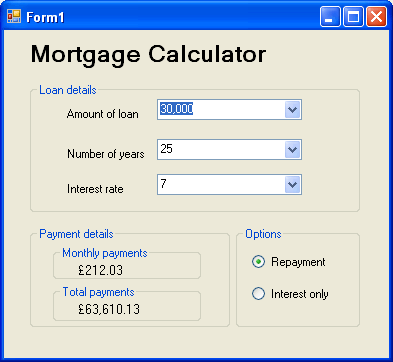
Private Sub ComboBox1_SelectedIndexChanged( Private Sub ComboBox3_SelectedIndexChanged(Now it all works! It is fascinating to see how the figures change almost instantly and it is certainly a good way of comparing mortgage options.
To access the complete project including the graphics once you have registered, click on CodeBin.
This is the fourth chapter of an eBook introducing Visual Basic 2010 - more soon! See also:Chapter 1 - Hello VBChapter 2 - Mastering VB Properties Chapter 3 - Mastering VB Events Chapter 5 - Graphics and Animation
If you would like to be informed about new articles on I Programmer you can either follow us on Twitter, on Facebook , on Digg or you can subscribe to our weekly newsletter. <ASIN:0538468459 > <ASIN:0470502215 > <ASIN:1430226021 > <ASIN:0132152134 > |