| The IBM PC |
Page 2 of 2
The motherboard was designed to hold 64KBytes of RAM but 16KBytes was all that was expected to be fitted initially. Industry standard 16K DRAMs were used and one of the channels of a three-channel timer was used to generate the refresh signal. The other two channels were used to make the speaker beep and to build an audio cassette interface - yes an audio cassette interface! In those days disk drives were rare and expensive things but most users still bought the disk version of the machine and the cassette interface was soon forgotten.
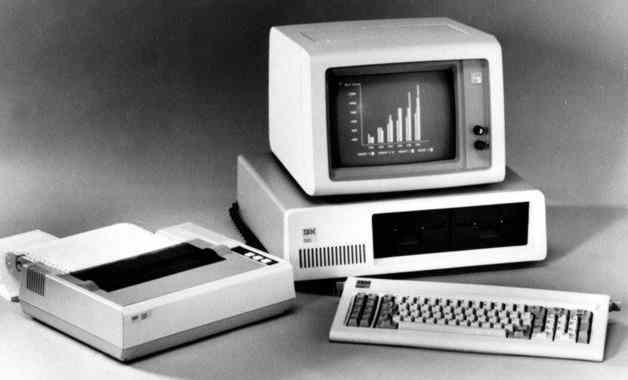
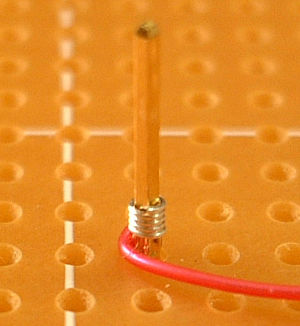
The IBM PC system They did build in an expansion bus though - the 8-bit ISA bus. Five expansion slot connectors were designed into the original motherboard and these soon proved inadequate. Although IBM was planning to use an open architecture policy for the PC, they never expected so many people to manufacture add-on cards. The early expansion cards only bothered to decode eight address bits and so claimed large chunks of I/O space without really needing to! Another design legacy that is still with us is the very few interrupt numbers that were available for use. This caused trouble finding a suitable allocation for address, interrupt and DMA channel for expansion cards. Little about the design was remarkable and almost any engineer could have put a similar machine together using just the Intel design sheets of the time. The incorporation of parity checking, i.e. the inclusion of a ninth bit in every memory location to detect errors, was unique. In practice parity checking isn't that useful but it did give the machine an air of seriousness. Experts, mostly mainframe and mini experts, were able to say that the PC had parity checked memory and so was a real machine. It also made use of 11% more memory chips than it really needed! Another typically IBM design decision was not to build any sort of graphics into the machine. The machine was aimed at the small business and the home market. For business it needed an 25 line by 80 column text-only display and for the home a 320x200 colour display was appropriate. So the whole idea of video display adapters and jargon like MDA (Monochrome Display Adapter) and CGA (Colour Graphics Adapter) was born. Both display designs were poor. The MDA flickered so badly that it had to be used with a long persistence monitor to reduce the flickering. The trouble was when the screen scrolled it left an after-image. The CGA was intended to be used with a standard TV set and so it had a very low resolution 320x200 mode. To use it in the 80x25 text mode and at 640x200 in two colours you needed a monitor. Most users bought a monitor! The whole design was prototyped using a wire wrap board, a method of construction where thin wire is wrapped around metal pins by a small hand gun. In theory the force of the wrapping welds the metal together but it doesn't always work that well. Two wire wraps were built and one was shipped off to Microsoft so that they could get on with developing the software. The trouble was that as the prototype heated up the wire wraps became loose and the board malfunctioned. Not the best way to try to develop software.
Close-up of a wire-wrap connection Photo taken by Haragayato Two CulturesAt this point it is tempting to go into the software side of the development - but this is mostly Microsoft's, and in particular Bill Gates' story. Although Bill Gates claims that he influenced the design of the machine, this seems unlikely. The use of the 8/16-bit 8088 is a logical step for the time and according to sources was taken before Gates knew about the project. The interesting part of the story is, of course, the meeting of the two cultures. Stuffy IBM and whiz-kid Microsoft didn't really seem likely candidates for a relationship and of course as it turned out in the long run they weren't! While they tried to make it work, the stories of IBM people turning up in tee-shirts and trainers to meetings that Microsoft people turned up to in blue suits make good telling. A more serious problem was IBM's attitude to security. The prototype was supposed to be kept in a secure place and IBM inspectors visited Microsoft to make sure that the conditions were adhered to. Most of the time Microsoft managed to get wind of the impending visiting and get the machine back into its allocated room. Once, however, they were caught out with the prototype half way down a corridor while its programmers played catch. When IBM finally introduced the PC the response wasn't what they expected. It wasn't really what anyone expected as the machine didn't look that good. IBM had forecast sales of 250,000 units over a five year period. They sold that many in the first few months. There were constant shortages of supply and even a black market at one point. They had managed to produce something that everyone wanted.
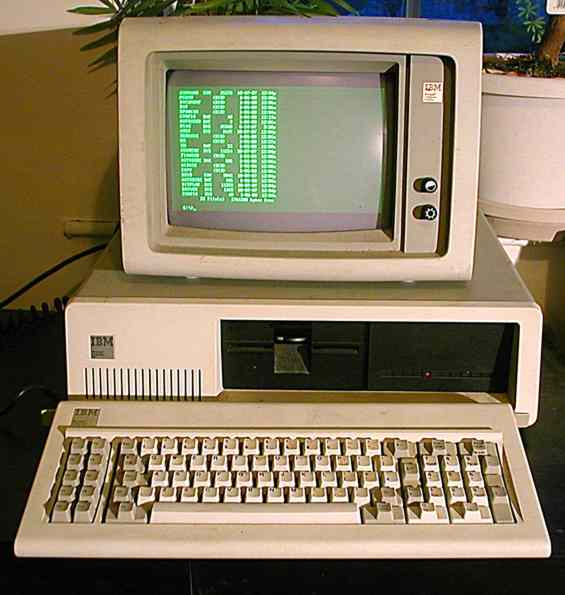
The IBM XT - the next model complete with optional hard disk. IBM's open architecture policy certainly contributed to the success of the machine. Software became available very rapidly and so did hardware add-ons. However IBM didn't quite get it right. Because they had used off-the-shelf parts other manufacturers were able to build copies, or clones, of the machine. In the early days people at IBM didn't seem at all sure about what it was that belong to them. They tried to make it sound as if parts of the machine were proprietary to IBM. They even emphasised the difference between PC-DOS and MS-DOS when they were in fact the same software produced by Microsoft. About the only part of the design that they could have claimed as their own was the BIOS - the code in the ROM that managed the hardware. This held up the clone manufacturers for some time but eventually they produced legal a BIOS ROMs by getting programmers to write it from scratch given only a functional definition and proof that there had been no access to IBM's code. Once the cloners got started the price fell.
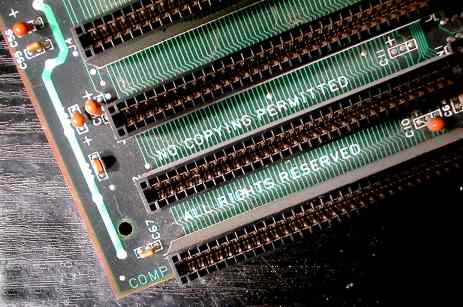
A corner of the IBM PC (XT) mainboard - the copyright notice wasn't enough protection IBM never really recovered from the shock of what happened. It must have felt like being mugged. Most of what it did after the PC looked very much like an attempt to get even. For example, when it designed the PS/2 range it made sure that it contained proprietary hardware and software. Any clone manufacturer who wanted to licence it had to pay back royalties on all of the PC machines they had built in the past - see what I mean about getting even! Today IBM doesn't make a personal computer at all.

<ASIN:0071362460> <ASIN: 0521084725> |
||||||
| Last Updated ( Friday, 22 May 2020 ) |