| Excel to KML - a VBA program |
| Written by Sue Gee | |||||
| Tuesday, 21 September 2010 | |||||
Page 3 of 4
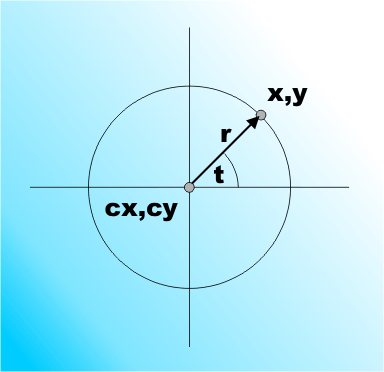
The Polygon functionTo draw a regular polygon as a symbol we first need to write a small function that will return the co-ordinates of the points of the corners of the polygon give its center and "radius". This is easier to write than you might think, once you know the equation for a circle in polar co-ordinates: cx= r*Cos t + + x cy= r*Sin t + y which gives a point on the circle of radius r centered on x,y at angle t.
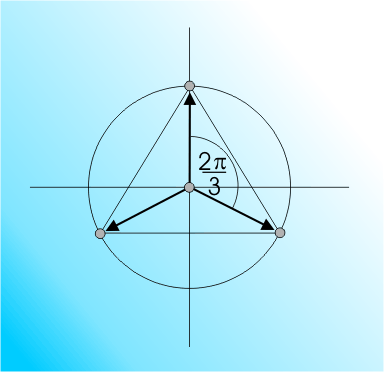
To generate the points of an n-sided polygon we simply need to evaluate the formulas for t equal to mulitples of 2Pi/n. For example for a triangle the angle is 2Pi/3:
The only complication is that a XML polygon has two extra requirements. The first is that you have to repeat the first point in its specification as the last point - i.e. to close the figure. The second is that the points have to be listed in a clockwise order. With these two practicalities in mind we can write the polygon function. First we need to setup some basic variables and constants: Private Function Polygon( The number of points to be generated is given by n and the results are to be returned in the Coords string as a set in the format x,y,z with one point to a line. The first and last points are best generated separately from the rest. The first point is: px1 = r * Sin(Angle * i) + x The final line converts the numeric values px1 and py1 into a comma separated string. Next we use a for loop to generate the rest of the points in the polygon: For i = 1 To n - 1 Finally we repeat the first point as the last point and return the result: Coords = Coords & px1 & "," & py1 & ",0" The complete function is: Private Function Polygon(
<ASIN:0470236825> <ASIN:1430216204> <ASIN:0596008651> |
|||||
| Last Updated ( Monday, 05 May 2014 ) |