| Unicode issues in Perl |
| Written by Nikos Vaggalis | ||||||
| Monday, 14 February 2011 | ||||||
Page 5 of 5
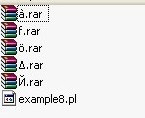
Mixing Greek, Latin and CyrillicLet's get another look at this asymmetry by adding more files with names from a variety of languages, creating a mix of Greek,Latin1 and Cyrillic:
#Example8.pl
which produces the result:
C:\unicode>perl example8.pl à.rar ö.rar Δ.rar Й.rar C:\unicode> It is interesting that the Latin1 and ASCII named files got implicitly downgraded from UTF8 to Perl's internal Unicode format. Hence the UTF8 flag is not turned on and if encode::is_utf8($filename) was applied it would return false Other issues with WindowsInternally the Windows C++ API's use the w_char data byte (UTF16,16bits) as 'real' Unicode while they treat UTF8 as a multibyte encoding, the same as an ANSI code page. In order to convert from ANSI to Unicode, the MultiByteToWideChar function is used, passing in the current ACP or OEMCP. To perform the reverse operation WideCharToMultiByte is used. These functions are equivalent to Perl's Encode::encode and Encode::decode.
Also note that when printing UTF to the console the font must be set to Lucida Console because it is Unicode enabled. However, the Lucida Console font does not support the whole Unicode range, so it does not include all Unicode glyphs. This means that you won't be able to see Japanese on the console, for example. There is another issue if you need to set the font on the user's console programmatically. This, unfortunately, can only be done on Windows Vista upwards with the SetCurrentConsoleFontEx api function;in older versions you have to resort to some hacks. There is a good MSDN article, Why are console windows limited to Lucida Console and raster fonts? if you want to go into this in more into depth. As a final note, the issues explored here are not strictly Perl-related but also affect other languages that use the command prompt, Python for example. UTF16 is directly and natively supported by .NET and its languages. <ASIN:0596102062> |
||||||
| Last Updated ( Monday, 04 April 2011 ) |