| VSCode Gets Agent Skills |
| Tuesday, 13 January 2026 | |||
|
The latest update of Visual Studio Code has added Agent Skills, which developers can use to provide domain-specific knowledge and teach new skills to the GitHub Copilot coding agent. Visual Studio Code is Microsoft's open source code editor that shares part of a name, but not much else, with full Visual Studio. It is open source under a MIT license and development has been conducted on GitHub.
Back in February 2025, the ability to use GitHub Copilot for AI-assisted code suggestions was added to the editor. This month's relelase sees the addition of support for Agent Skills, which can be used to teach the coding agent new capabilities and provide domain-specific knowledge. Agent Skills are folders of instructions, scripts, and resources that GitHub Copilot can load when relevant to perform specialized tasks.
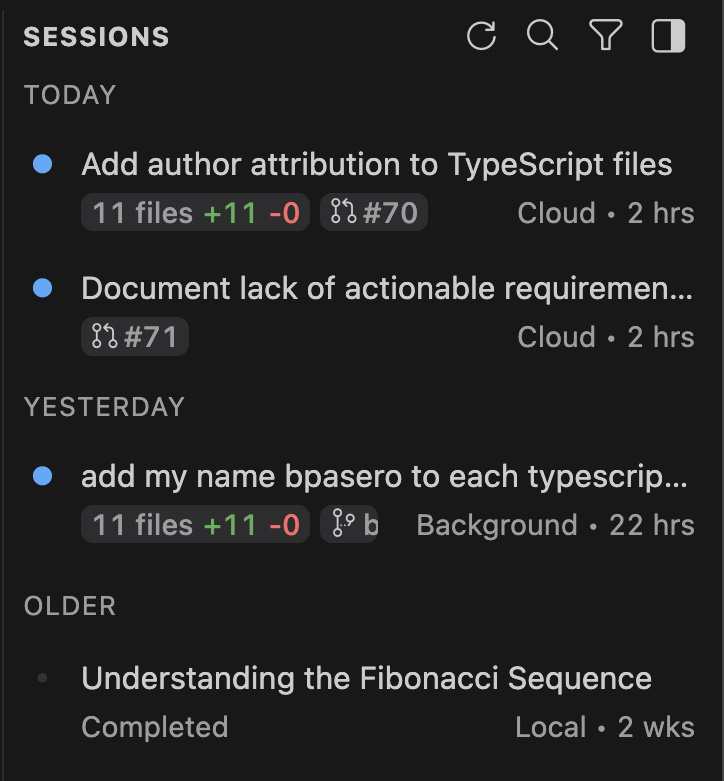
Skills are stored in directories with a SKILL.md file that defines the skill's behavior. VS Code automatically detects skills from the .github/skills folder in your workspace. They are then loaded on-demand into the chat context when relevant for your request. The Agent Sessions view has also been improved, with new keyboard access support for actions such as archive, read state, opening a session; and the grouping of sessions based on state and age when showing side-by-side. There's also new support for archiving multiple sessions at once from the new group sections. Elsewhere, the Quick Pick for chat sessions is now based on the same information that drives the Agent Sessions view. You can access any previous chat session from there and perform actions like archiving, renaming or deletion. Still in chat, the Chat view title control is now showing up, irrespective of how the Activity Bar is configured. Previously, it only showed up in the default Activity Bar configuration. Other changes to the current release include a reworking of the defaults for terminal IntelliSense, which was introduced recently. Users have provided negative feedback, so the VSCode developers have changed the defaults. While terminal IntelliSense is still enabled by default, the control is only shown when the user specifically activates it using Ctrl+Space, rather than being shown automatically when typing. A new setting, chat.tools.terminal.preventShellHistory, has been added that can be used to prevent commands run by the terminal tool from being included in shell history for bash, zsh, pwsh, and fish. Visual Studio Code 1.108 is available now.
More InformationRelated ArticlesVSCode SQL Extension Gets Schema Designer Microsoft Releases Prompty Extension For VSCode VS Code Extensions Can Now Use Copilot APIs To be informed about new articles on I Programmer, sign up for our weekly newsletter, subscribe to the RSS feed and follow us on Facebook or Linkedin. 
Comments
or email your comment to: comments@i-programmer.info |
|||
| Last Updated ( Tuesday, 13 January 2026 ) |