| Supabase's Vector Buckets |
| Written by Nikos Vaggalis | |||
| Monday, 12 January 2026 | |||
|
Supabase has released Vector Buckets, specialized storage containers optimized for vector data. This is welcome as it expands your options for storing vectors. In Amazon S3 Vectors Or PostgreSQL- Is This The End Of Specialized Vector Stores? we explored the idea that At that time the choice appeared to be one OR the other; pgvector or S3 vectors. Not any more. Here comes Supabase with a proposition that utilizes both under the same roof. The introduction of Vector Buckets gives you the durability and cost efficiency of Amazon S3 with built-in similarity search. With that, you can now have more options for how you store vectors:
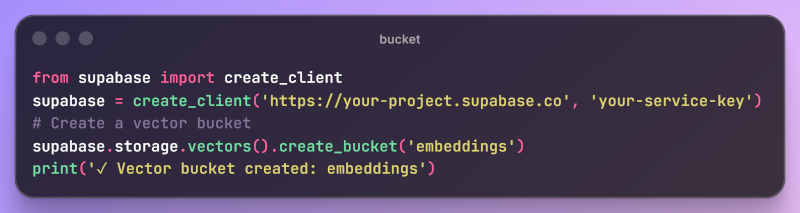
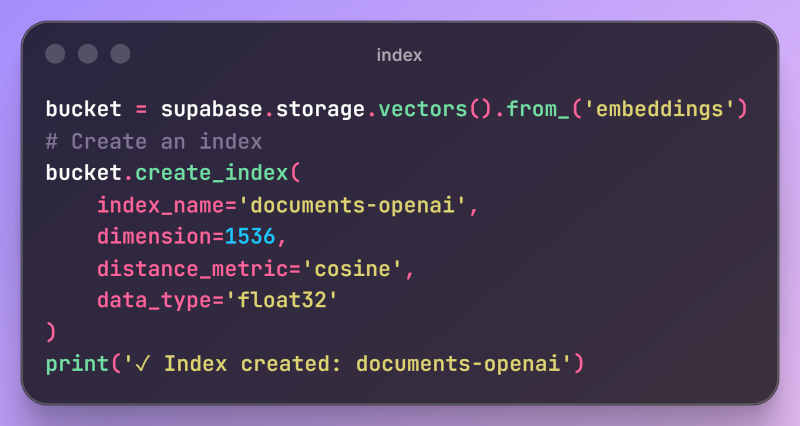
Digging into it, the main issue here has to do with latency and real time performance. Therefore it is recommended to store hot vectors in pgvector for the highest-traffic, most latency-sensitive queries and warm or cold vectors in Vector Buckets for everything else. Architecturally, Vector Buckets follow the same principles of Amazon S3 vector stores. Built on S3-compatible storage, it's a cloud object store with native support to store and query vectors; that means that it can cope with great amounts of data. Each vector index supports up to tens of millions of vectors (50M per index at the time of writing) and you can create multiple indexes per bucket (for tenants, models, or domains). Indexes and Vectors aside, each vector bucket also contains metadata that keep additional context about vectors (text, tags, IDs, etc.) The workflow for utilizing Buckets them is as follows: 1.Create a bucket to organize your vector data 2.Create indexes within the bucket with specified dimensions and distance metrics 3.Store vectors with embeddings and optional metadata 4.Query vectors using similarity search to find nearest neighbors You can do that through the Supabase Dashboard or through code using the SDK. Here's the SDK apporach for steps 1 and 2: Create bucket
Create index
All fine, but in the end what are they good for? Ideal use cases range from Semantic Search - find documents or images similar to a query to Recommendation Systems - suggest products, content, or connections based on embeddings to, of course, RAG. Finally, vector Buckets are free to use (fair use policy applies) during Public Alpha. Egress costs still apply. Thus, if you're a Supabase client already, then you can go ahead and test them out for your own purposes.
More InformationRelated ArticlesAmazon S3 Vectors Or PostgreSQL- Is This The End Of Specialized Vector Stores? To be informed about new articles on I Programmer, sign up for our weekly newsletter, subscribe to the RSS feed and follow us on Facebook or Linkedin. 
Comments
or email your comment to: comments@i-programmer.info |
|||
| Last Updated ( Monday, 12 January 2026 ) |