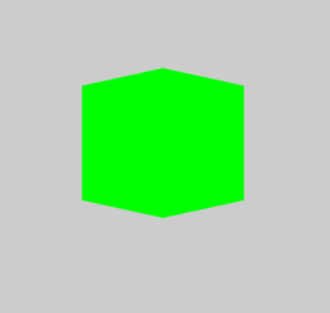
Once we have the unit cube defined we need to create a transform to move it to a new location and add a rotation so that we can see more than the front face:
var angle = 45*Math.PI/180;
var sy = Math.sin(angle);
var cy = Math.cos(angle);
var mvMatrix = [
                cy, 0, sy, 0,
                 0, 1,  0, 0,
               -sy, 0, cy, 0,
                 0, 0, -6, 1
                ];
The only other change needed to the draw instruction is:
Without coloring or lighting the faces, this is as good as it gets.
It is easy to create a rotating cube by defining a run function that is called in a requestAnimationFrame. This updates the transformation matrix to give a new rotation angle, clears the canvas and redraws the cube:
var theta = 0;
var vertices;
var gl;
function run(t) {
  var angle = theta++ * Math.PI / 180;
  var sy = Math.sin(angle);
  var cy = Math.cos(angle);
  var mvMatrix = [
                  cy, 0, sy, 0,
                   0, 1,  0, 0,
                 -sy, 0, cy, 0,
                   0, 0, -6, 1
                ];

  var shaderMVMatrix = gl.getUniformLocation(gl.
         getParameter(gl.CURRENT_PROGRAM),
                                      "modelViewMatrix");
  gl.uniformMatrix4fv(shaderMVMatrix, false,
                            new Float32Array(mvMatrix));
  gl.clear(gl.COLOR_BUFFER_BIT | gl.DEPTH_BUFFER_BIT);
  gl.drawArrays(gl.TRIANGLE_STRIP, 0,
                                 vertices.length / 3.0);
  gl.flush();
  requestAnimationFrame(run);
}
To allow the function to use some of the objects they have to be converted into global variables.
Listing - Rotating Cube
The complete listing for the rotating cube, after slight cleaning up is:
<!DOCTYPE html>
<html>
  <head>
    <title>JavaScript Graphics</title>
    <meta charset="UTF-8">
    <meta name="viewport" content="width=device-width,
                                     initial-scale=1.0">
   </head>
   <body>
    <script>
function createCanvas(h, w) {
  var c = document.createElement("canvas");
  c.width = w;
  c.height = h;
  return c;
}
function createShaders(gl, vs, fs) {
  var vertexShader = gl.createShader(gl.VERTEX_SHADER);
  gl.shaderSource(vertexShader, vs);
  gl.compileShader(vertexShader);
  if (!gl.getShaderParameter(vertexShader,
                            gl.COMPILE_STATUS)) {
   alert("Error in vertex shader");
   var compilationLog = gl.getShaderInfoLog(
                                          vertexShader);
   console.log('Shader compiler log: ' + compilationLog);
   gl.deleteShader(vertexShader);
   return;
  }
  var fragmentShader = gl.createShader(
                                     gl.FRAGMENT_SHADER);
  gl.shaderSource(fragmentShader, fs);
  gl.compileShader(fragmentShader);
  if (!gl.getShaderParameter(fragmentShader,
                                   gl.COMPILE_STATUS)) {
   alert("error in fragment shader");
   var compilationLog = gl.getShaderInfoLog(
                                        fragmentShader);
   console.log('Shader compiler log: ' + compilationLog);
   gl.deleteShader(fragmentShader);
   return;
  }
  return [vertexShader, fragmentShader];
 }
function createProgram(gl, shaders) {
  var program = gl.createProgram();
  gl.attachShader(program, shaders[0]);
  gl.attachShader(program, shaders[1]);
  gl.linkProgram(program);
  if (!gl.getProgramParameter(program, gl.LINK_STATUS)) {
    alert("Error in shaders");
    gl.deleteProgram(program);
    gl.deleteProgram(vertexShader);
    gl.deleteProgram(fragmentShader);
    return;
  }
  return program;
}
function perspective(angle, aspect, zMin, zMax) {
  var tan = Math.tan(angle * Math.PI / 180);
  var A = -(zMax + zMin) / (zMax - zMin);
  var B = (-2 * zMax * zMin) / (zMax - zMin);
  return [.5 / tan,                  0, 0, 0,
                  0, .5 * aspect / tan, 0, 0,
                  0,                0,  A,-1,
                  0,                0,  B, 0
         ];
}
function draw3d() {
 gl = document.body.appendChild(createCanvas(400, 400)).
                                    getContext("webgl2");
 if (!gl)
  alert("no webgl2");
 gl.viewport(0, 0, gl.canvas.width, gl.canvas.height);
 var vsScript = `attribute vec3 vertexPosition;
                uniform mat4 modelViewMatrix;
                uniform mat4 perspectiveMatrix;
                void main(void) {
             gl_Position = perspectiveMatrix *
              odelViewMatrix * vec4(vertexPosition, 1.0);
                }`;
 var fsScript = `void main(void) {
                gl_FragColor = vec4(0.0, 1.0, 0.0, 1.0);
                }`;
 var shaders = createShaders(gl, vsScript, fsScript);
 var program = createProgram(gl, shaders);
 gl.useProgram(program);
var pMatrix = perspective(20, 1, 0.1, 100);
var shaderpMatrix = gl.getUniformLocation(program,
                                "perspectiveMatrix");
gl.uniformMatrix4fv(shaderpMatrix, false,
                             new Float32Array(pMatrix));
var vertexPos = gl.getAttribLocation(program,
                                      "vertexPosition");
var vertexBuffer = gl.createBuffer();
gl.bindBuffer(gl.ARRAY_BUFFER, vertexBuffer);
gl.vertexAttribPointer(vertexPos,
                        3.0,
                        gl.FLOAT,
                        false,
                        0, 0);
vertices = new Float32Array(
                 [
                 // Front face
                 -1.0, -1.0, 1.0,
                  1.0, -1.0, 1.0,
                  1.0, 1.0, 1.0,
                 -1.0, 1.0, 1.0,
                 // Back face
                 -1.0, -1.0, -1.0,
                 -1.0, 1.0, -1.0,
                  1.0, 1.0, -1.0,
                  1.0, -1.0, -1.0,
                 // Top face
                 -1.0, 1.0, -1.0,
                 -1.0, 1.0, 1.0,
                  1.0, 1.0, 1.0,
                  1.0, 1.0, -1.0,
                 // Bottom face
                 -1.0, -1.0, -1.0,
                  1.0, -1.0, -1.0,
                  1.0, -1.0, 1.0,
                 -1.0, -1.0, 1.0,
                 // Right face
                  1.0, -1.0, -1.0,
                  1.0, 1.0, -1.0,
                  1.0, 1.0, 1.0,
                  1.0, -1.0, 1.0,
                 // Left face
                 -1.0, -1.0, -1.0,
                 -1.0, -1.0, 1.0,
                 -1.0, 1.0, 1.0,
                 -1.0, 1.0, -1.0
                ]);
  gl.bufferData(gl.ARRAY_BUFFER, vertices,
                                   gl.STATIC_DRAW);
  gl.enableVertexAttribArray(vertexPos);
  gl.clearColor(0.8, 0.8, 0.8, 1.0);
  gl.enable(gl.DEPTH_TEST);
  gl.depthFunc(gl.LEQUAL);
  gl.clear(gl.COLOR_BUFFER_BIT | gl.DEPTH_BUFFER_BIT);
  requestAnimationFrame(run);
}
var theta = 0;
var vertices;
var gl;
function run(t) {
  var angle = theta++ * Math.PI / 180;
  var sy = Math.sin(angle);
  var cy = Math.cos(angle);
  var mvMatrix = [
                   cy, 0, sy, 0,
                    0, 1, 0, 0,
                  -sy, 0, cy, 0,
                    0, 0, -6, 1
                  ];
  var shaderMVMatrix = gl.getUniformLocation(
           gl.getParameter(gl.CURRENT_PROGRAM),
                                     "modelViewMatrix");
  gl.uniformMatrix4fv(shaderMVMatrix, false,
                            new Float32Array(mvMatrix));
  gl.clear(gl.COLOR_BUFFER_BIT |   gl.DEPTH_BUFFER_BIT);
  gl.drawArrays(gl.TRIANGLE_STRIP, 0,
                                vertices.length / 3.0);
  gl.flush();
  requestAnimationFrame(run);
}
draw3d();
  </script>
 </body>
</html>
Summary
Canvas supports WebGL 1 and 2 but only version 1 is well supported.
WebGL is a 2D rendering system implemented in hardware. It has enough flexibility to implement 3D graphics, but nothing is provided as standard.
You have to supply two shaders to control how graphics are rendered. The vertex shader modifies the co-ordinates of the points you supply, which are used to define triangles. The fragment shader is called for each of the interior pixels to set its color.
A vertex and fragment shader go together to form a program. You can have more than one program, but only one is active at any given time.
You load shaders from JavaScript strings into the GPU.
Vertices are specified to the vertex shader in attribute arrays. The shader is called once for each element in the buffer associated with the attribute.
Uniforms are shader variables that can be set from JavaScript. They remain constant during the processing of the elements in the vertex buffer.
Before you can draw anything you have to set up connections between the JavaScript data and the uniforms and attributes in the shaders.
Uniforms are easy to use, but attributes take more setting up and definition.
For 3D graphics there is a standard set of matrices used to convert a 3D point to 2D. The most common perform rotation, scaling and translation, followed by a perspective transformation.
You can think of a perspective transformation as being like a camera with a given focal length lens positioned at the origin and looking down the z axis.
You can draw 3D objects at unit size and centered on the origin and then move them to the desired location in front of the “camera” using the transformation matrix.
Now available as a paperback or ebook from Amazon.