| Raspberry Pi CM5 IoT In C - Getting Started With SPI |
| Written by Harry Fairhead | |||||||||||||||||||||||||
| Monday, 29 December 2025 | |||||||||||||||||||||||||
Page 2 of 4
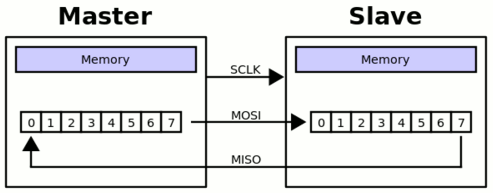
SPI ProtocolThe data transfer on the SPI bus is slightly odd. What happens is that the master pulls one of the chip selects low, which activates a slave. Then the master toggles the clock SCLK and both the master and the slave send a single bit on their respective data lines. After eight clock pulses a byte has been transferred from the master to the slave and from the slave to the master. You can think of this as being implemented as a circular buffer, although it doesn't have to be.
Notice this circular buffer arrangement allows for slaves to be daisy-chained with the output of one going to the input of the next. This makes the entire chain one big circular shift register. This can make it possible to have multiple devices with only a single chip select, but it also means any commands sent to the slaves are received by each one in turn. For example, you could send a convert command to each A to D converter in turn and receive back results from each one. The final odd thing about the SPI bus is that there are four modes which define the relationship between the data timing and the clock pulse. The clock can be either active high or low, which is referred to as clock polarity (CPOL), and data can be sampled on the rising or falling edge of the clock, which is clock phase (CPHA).
All combinations of these two possibilities gives the four modes:
*The way that the SPI modes are labeled is common but not universal. There is often a problem trying to work out what mode a slave device uses. The clock polarity is usually easy and the clock phase can sometimes be worked out from the data transfer timing diagrams by noting that:
So to configure the SPI bus to work with a particular slave device:
SPI DriverBefore you can use the SPI bus you have to load its driver. You can do this by adding: dtparam=spi=on to the /boot/firmware/config.txt file. This loads a driver for SPI0 using two chip select lines. To find out how to activate other SPI channels see later. For the rest of this section we will be using SPI0. Alternatively you can activate the driver dynamically: FILE *doCommand(char *cmd)
{
FILE *fp = popen(cmd, "r");
if (fp == NULL)
{
printf("Failed to run command %s \n\r", cmd);
exit(1);
}
return fp;
}
void checkSPI0()
{
FILE *fd = doCommand("sudo dtparam -l");
char output[1024];
int txfound = 0;
char indicator[] = "spi=on";
char command[] = "sudo dtparam spi=on";
while (fgets(output, sizeof(output), fd) != NULL)
{
printf("%s\n\r", output);
fflush(stdout);
if (strstr(output, indicator) != NULL)
{
txfound = 1;
}
}
if (txfound == 0)
{
fd = doCommand(command);
sleep(2);
}
pclose(fd);
}
This works by first using the dtparam -l command to list the loaded overlays. If the spi overlay is already loaded nothing is done. If it isn’t then it runs the command: dtparam spi = on |
|||||||||||||||||||||||||
| Last Updated ( Wednesday, 31 December 2025 ) |