| Who Needs Hardware When You Have An Arduino Simulator |
| Written by Harry Fairhead | |||
| Sunday, 23 December 2012 | |||
|
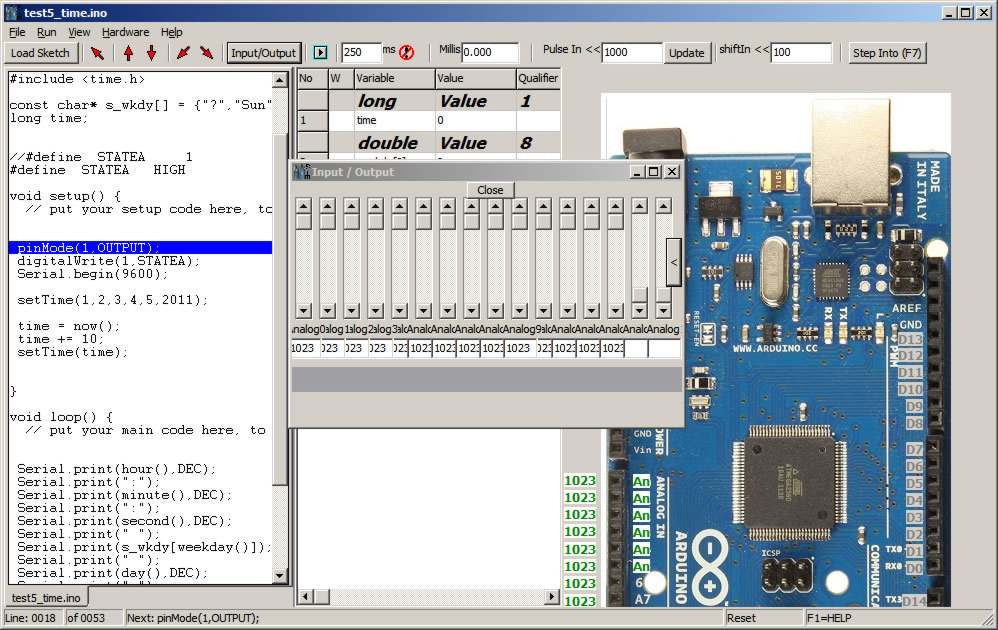
The Raspberry Pi was created to get people programming and the Arduino is a great way to learn about physical computing but perhaps both approaches are wrong - at least initially. What about using a simulator instead? Simulators for hardware like the Arduino have lots of advantages for the complete beginner. For one thing you can't damage the hardware which, while difficult to do, is something that worries beginners. Click for larger image
The simulator will run on Windows and on Linux using Wine and on Mac using Parallels. There is a hardware options menu that lets you select the type of Arduino you want to use - Due, Leonardo, Mega or Nano. You can also use an LCD display.
You can see the simulator in action in the video:
The problem is that you can't add custom hardware or shields, so the whole thing is limited to testing out your code to see how it responds to raw inputs and outputs. For initial teaching and experimentation this is fine, but there is no doubt the the simulator is intended to be used along with a real Arduino and some extra hardware. You can download a trial version, which is limited after 14 days in how fast it loads programs. Upgrading to the full version costs $11.99, but this will rise to $50 for the Version 1 product.
To be informed about new articles on I Programmer, install the I Programmer Toolbar, subscribe to the RSS feed, follow us on, Twitter, Facebook, Google+ or Linkedin, or sign up for our weekly newsletter.
Comments
or email your comment to: comments@i-programmer.info

|
|||
| Last Updated ( Tuesday, 01 January 2013 ) |